

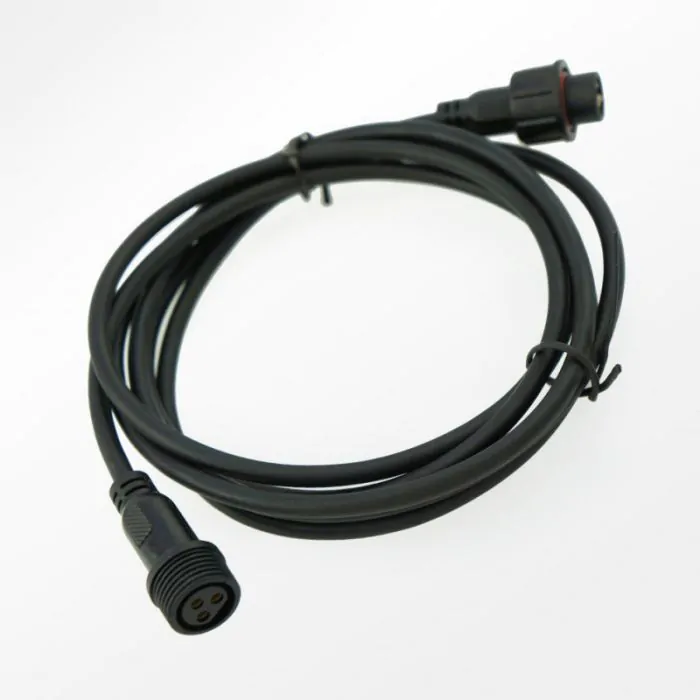
IceCap Gyre Pump 2m Extension Cable
SKU: IP-GYEXTCBL
- Extended 2-Meter Structural Reach: Adds 2 meters (2m / ~6.56 feet) of extra line path, allowing you to store sensitive electronic controllers inside dry sections of your cabinet.
- Universal Cross-Flow Compatibility: Explicitly pinned to interface seamlessly across IceCap Gyre 1K, 2K, 3K, and 4K generation pump configurations.
- Threaded Waterproof Locking Collars: Outfitted with specialized male-to-female locking union caps that form a watertight, moisture-resistant seal against salt spray.
- Heavy-Duty Insulated Shielding: Thick polymer jacket insulation protects the interior low-voltage signal lines from salt creep corrosion, kinks, and pinches.
- Maintains Native Signal Integrity: High-fidelity interior copper routing passes complex pulse wave frequencies and reverse-current instructions with zero voltage drop.
- Eliminates Cord Tensions: Prevents strain on pump motor cords, reducing the risk of internal copper wire fractures or cable rim slippage during maintenance.

IceCap
Premium aquarium equipment without the premium price. Protein skimmers, pumps, reactors, heaters & more.
IceCap Gyre Pump to Controller 2-Meter Extension Cable (IP-GYEXTCBL)
The IceCap Gyre 2m Extension Cable (SKU: IP-GYEXTCBL) is an authentic factory-direct connection accessory distributed by CoralVue to offer enhanced equipment placement flexibility in standard and custom aquarium installations. When designing a clean aquarium electronics control center, location is everything. Keeping advanced wavemaker drivers, smart controller modules, and power strips isolated from humid sump partitions, salt spray, and accidental splash drops is vital for system longevity. However, standard cross-flow wavemaker lines are often too short to reach outside high-moisture cabinet frames. The IP-GYEXTCBL solves this placement limitation completely, adding 2 meters (~6.5 feet) of durable, insulated range to bridge your pump seamlessly to your dry zone.
This premium extension cord features precision-molded multi-pin connection heads that integrate perfectly across all generation models of IceCap cross-flow lines—including the Gyre 1K, 2K, 3K, and 4K pumps. To ensure absolute safety around water, the cable terminals are fitted with threaded, interlocking waterproof O-ring sleeves. Once pushed together and twisted lock-tight, these collars create a gas-tight, splashproof boundary that seals out creeping salt crusts and moisture tracking. Built with high-grade copper internal paths wrapped in an abrasion-resistant outer shielding layer, this cable provides maximum durability and clean, un-interrupted communication telemetry between the driver microchips and your pump motor blocks.
Key Features
Protects Expensive Control Hardware: Allows you to position basic controllers or smart hubs deep inside adjacent equipment cabinets or elevated dry mounting brackets.
Watertight Industrial Unions: Threaded mechanical connectors anchor securely, preventing accidental disconnects if cords are accidentally yanked during filtration cleanings.
Reef Enclosure Safeguards: Tough, non-reactive outer casing stands up to the damp environments found under reef sump displays without cracking or leaking plasticizers.
(Note: This electrical accessory item contains only (1) 2-meter male-to-female pump extension cord thread assembly. Dedicated gyre wavemakers, controller drivers, and wall power blocks are sold under separate product categories).
What’s Included:
(1) IceCap Gyre 2-Meter (6.5ft) Pump-to-Controller Extension Cable with Locking Collars
Technical Specs:
Official Manufacturing Title: IceCap Gyre 1K, 2K, 3K, 4K Pump Extension Cable
SKU / Factory Part Identifier: IP-GYEXTCBL (Cross-Reference: IC-3KEXTCBL)
Total Cable Physical Length: 2.0 Meters / 6.56 Feet
Interface Form Factor: Specialized Multi-Pin Male-to-Female Configuration
Moisture Defense Core: Threaded Mechanical Locking Unions with Interior Gaskets
Compatible Equipment Lines: IceCap Gyre 1K, IceCap Gyre 2K, IceCap Gyre 3K, IceCap Gyre 4K
Installation Environment Rating: High-Humidity Splashproof (External Sump/Cabinet Use Only; Do Not Submerge Cable Junctions)
Warranty
CoralVue, Inc. hereby guarantees this product to be free from defects in material and workmanship for a period of:
- 1 Year
Warranty is activated on the date of purchase.
This Standard Limited Warranty applies and is limited as follows:
- To the product only as long as it remains in the possession of the original purchaser.
- To the product that has not been subject to accident, misuse or abuse.
- To the product that has not been modified, altered, defaced, or had repairs made or attempted by other than CoralVue, Inc.
- That CoralVue be immediately notified in writing within ten (10) days of first knowledge of defect by owner or his agent.
- That CoralVue, Inc. shall be given first opportunity to make any repairs, replacements or corrections to the defective construction within a reasonable period of time.
- Under no circumstances shall CoralVue and/or the Manufacturer be liable by virtue of this warranty or otherwise for damage to any person or property whatsoever for any special, indirect, secondary or consequential damages of any nature however arising out of the use or inability to use because of the product defect.
- Power down your aquarium wavemaker setup entirely by unplugging the main power supply from your wall outlet or power bar.
- Trace the cable line leading from your submerged IceCap Gyre pump block back to its control module terminal. Carefully unthread the locking sleeve counter-clockwise and separate the stock connection points.
- Take your IP-GYEXTCBL extension cable and check the orientation pins inside the receiving head. Align the internal indexing notch perfectly with the pump’s output male pins. Caution: Never force the plugs together; verify the pin layout alignment to prevent bending copper points.
- Push the connectors firmly together until they bottom out against the internal gasket ring. Thread the external plastic collar clockwise until it is finger-tight to establish a moisture-proof seal.
- Direct the opposite female end of the extension cable straight to your controller hub port, align the indexing track, press together, and secure the remaining locking collar cap tight.
- Route your extended wire run cleanly along your cabinet ribs using cable ties or mounting clips, ensuring a relaxed drip loop is established below the electronics. Plug the main power brick back into the wall to test your current.
Pro Tips:
- Never Line up Multi-Pin Connections Blindly; Check the Alignment Notch First. The multi-pin aviation terminals inside Gyre extension cables are keyed to fit together in only one exact direction. If you try to push the heads together blindly without verifying the internal alignment slot, you can easily shear or flatten the internal copper pins, permanently ruining the cable or shorting out your wavemaker block. Always look inside the sleeve to verify the alignment notch matches up before sliding the cable parts together.
- Keep the Interlocking Threaded Connections Completely Out of Submerged Sump Areas. While the threaded locking collars are designed with rubber gaskets to provide elite splashproof protection against ambient evaporation and high salt creep, they are not rated for continuous underwater submersion. Never drop or suspend the connection junction points directly inside your sump water column or overflow partitions. Always position your cable connection unions high up inside the cabinet structure where they stay completely dry.
- Always Secure Your Extended Cable Lines with an Integrated In-Line Drip Loop. When extending your hardware cable length across your aquarium stand, never allow the line to stretch perfectly flat between the tank rim and your control center. Always leave a relaxed, hanging U-shaped "drip loop" in the wire run below the physical level of the electronic inputs. If water drops travel along the cord jacket during glass scraping or filter maintenance, the loop forces the moisture to collect and drop safely onto your cabinet mat instead of wicking straight down into your connection terminals.