

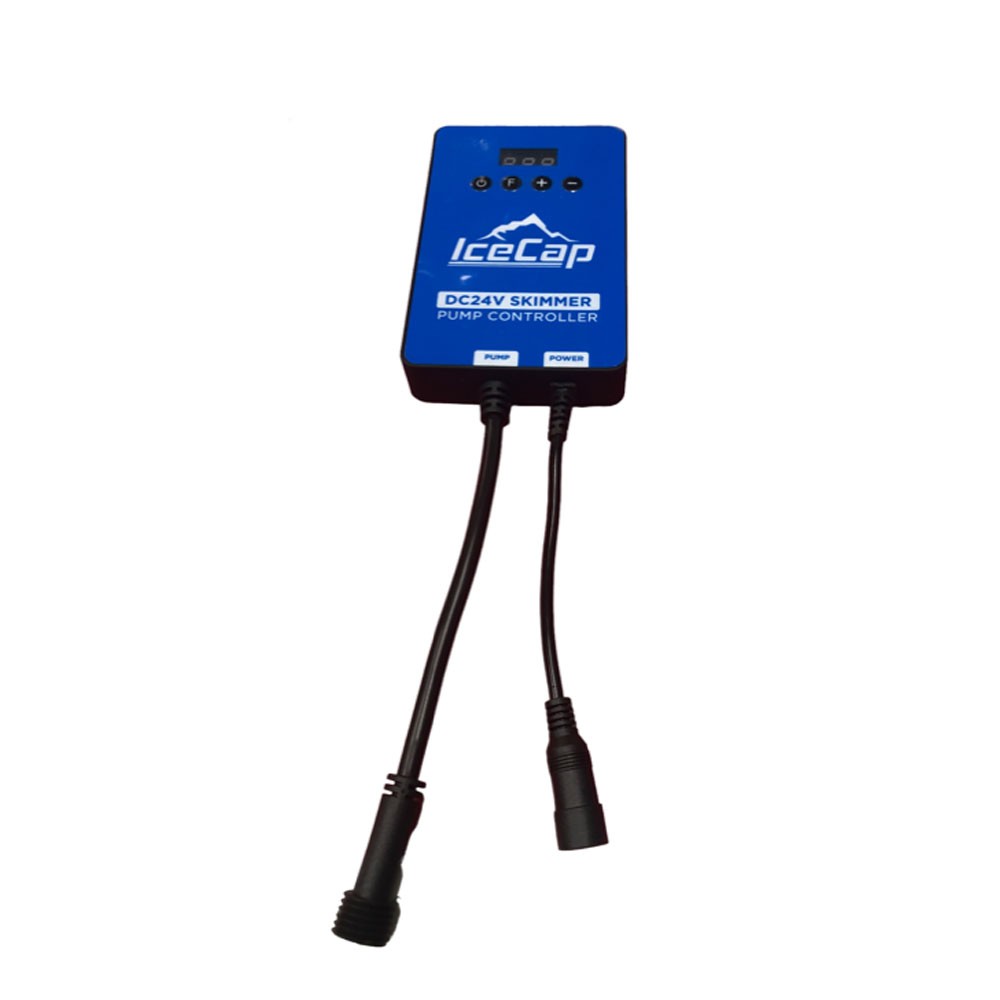


IceCap DCAIR 6.0 Controller
SKU: IP-DCAIR-6-CTL
- Direct OEM Replacement: Factory-original variable speed control module engineered specifically for the IceCap DCAIR 6.0 DC Skimmer Pump.
- Precision Speed & Air Control: Incrementally adjust needlewheel motor RPM to dial in exact foam density and eliminate skimmer cup overflows.
- Integrated Feed Mode Timer: Pause skimming for 10-minute intervals during coral feeding or water treatment dosing without losing your preset speed setting.
- Soft-Start Safety Ramp: Gradually ramps motor speed back up after feeding pauses to prevent sudden foam surges into the collection cup.
- Plug-and-Play DC Connectors: Features pre-wired, waterproof quick-connect ports for direct attachment to the DCAIR 6.0 pump harness and 24V DC power supply.

IceCap
Premium aquarium equipment without the premium price. Protein skimmers, pumps, reactors, heaters & more.
![[Consumer Shipping Information] 📦 Shipping FAQ](/web/image/dr.website.content/27/image/%5BConsumer%20Shipping%20Information%5D%20%F0%9F%93%A6%20Shipping%20FAQ?unique=bbc76b0)
IceCap DCAIR 6.0 Controller
Optimizing organic waste removal in high-capacity reef aquariums requires precise control over the air-to-water ratio inside your protein skimmer body. The IceCap DCAIR 6.0 Controller (SKU: IP-DCAIR-6-CTL) is the official OEM replacement variable speed driver designed specifically for the IceCap DCAIR 6.0 DC Skimmer Pump. Under-cabinet environments present harsh operating conditions where salt creep, high humidity, or power line spikes can compromise controller microchips over time.
This factory replacement controller restores full operational control over your skimmer's needlewheel pump. Featuring digital push-button controls, it allows aquarists to fine-tune motor speed to match changing aquarium bioloads and water parameters. The clear LED readout displays active power levels at a glance, while built-in memory saves your speed settings during power interruptions.
Ideal Replacement Scenario
If your DCAIR 6.0 controller shows non-responsive control buttons, displays error codes, or fails to send power to the needlewheel pump despite receiving 24V DC input, replacing the controller restores complete skimmer automation without replacing the entire pump block.
(Note: Package includes (1) Standalone IceCap DCAIR 6.0 Controller Unit).
What’s Included:
(1) IceCap DCAIR 6.0 Replacement DC Skimmer Pump Controller (IP-DCAIR-6-CTL)
Technical Specs:
SKU / Factory Part Identifier: IP-DCAIR-6-CTL
Operating Voltage: 24V DC Input
Display Type: Digital LED Status Display
Control Functions: Power On/Off, Speed +/- Adjustment, 10-Min Feed Mode
Housing Material: Water-Resistant ABS Polymer
Primary Compatibility: IceCap DCAIR 6.0 DC Skimmer Pump (IceCap K2-100 Skimmer)
WARRANTY
CoralVue, Inc. hereby guarantee this product to be free from defects in material and workmanship for a period of:
- 90days
Warranty is activated on the date of purchase.
This Standard Limited Warranty applies and is limited as follows:
- To the product only as long as it remains in the possession of the original purchaser.
- To the product that has not been subject to accident, misuse, or abuse.
- To the product that has not been modified, altered, defaced, or had repairs made or attempted by other than CoralVue, Inc.
- That CoralVue be immediately notified in writing within ten (10) days of the owner's or his agent's first knowledge of the defect.
- That CoralVue, Inc. shall be given the first opportunity to make any repairs, replacements, or corrections to the defective construction within a reasonable period of time.
- Under no circumstances shall CoralVue and/or the Manufacturer be liable by virtue of this warranty or otherwise for damage to any person or property whatsoever for any special, indirect, secondary, or consequential damages of any nature, however arising out of the use or inability to use because of the product defect.
Click here to learn more.
Installation & Set-Up Guidelines:
Disconnect power to your skimmer by unplugging the 24V DC power supply from the wall outlet.
Unscrew the waterproof cable connector joining the old controller to the DCAIR 6.0 skimmer pump lead.
Mount the new IP-DCAIR-6-CTL unit high on an interior cabinet wall using mounting screws or heavy-duty mounting tape.
Align the internal pins and screw the pump connection lead firmly onto the new controller harness.
Connect your 24V DC power supply jack into the controller input port, restore wall power, and set your desired operating speed.
Pro Tips:
- Mount Above Sump Water Line. Always install the controller box high inside your aquarium stand above the water level of your sump. Keeping the controller elevated prevents moisture condensation and accidental salt creep from entering the rear cable entries.
- Utilize the Feed Button to Prevent Overflows. When feeding corals or adding liquid additives that lower surface tension, press the "Feed" button instead of shutting off power manually. The controller pauses the pump for 10 minutes and slowly ramps back up, preventing violent skimmer cup boil-overs.